
Bambu Lab P1S 3D Printer
Looking for a Bambu Lab P1S 3D Printer for professional 3D printing, rapid prototyping, product development, business applications, or advanced hobby projects? Paradise 3D helps buyers choose the right Bambu Lab P1S configuration based on their application, materials, printing requirements, and workflow.
The Bambu Lab P1S 3D Printer is an enclosed CoreXY desktop 3D printer designed around fast printing, automated features, material versatility, and an integrated software ecosystem. Its enclosed design makes it particularly attractive to users who want greater flexibility than a typical open-frame desktop printer.
For users interested in multi-color or multi-filament workflows, the P1S can also be paired with Bambu Lab’s compatible Automatic Material System (AMS).
Whether you are comparing the standard printer with a Bambu Lab P1S Combo, checking the latest Bambu Lab P1S 3D Printer price in India, or planning to buy a P1S in Delhi, Paradise 3D can help you understand available options before you purchase.
Contact Paradise 3D to check current availability and request the latest quotation for the Bambu Lab P1S 3D Printer in Delhi.
[ Upload File ] (Supports STL • OBJ • STEP • 3MF • IGES • SolidWorks • Fusion 360)
Book a call With Expert
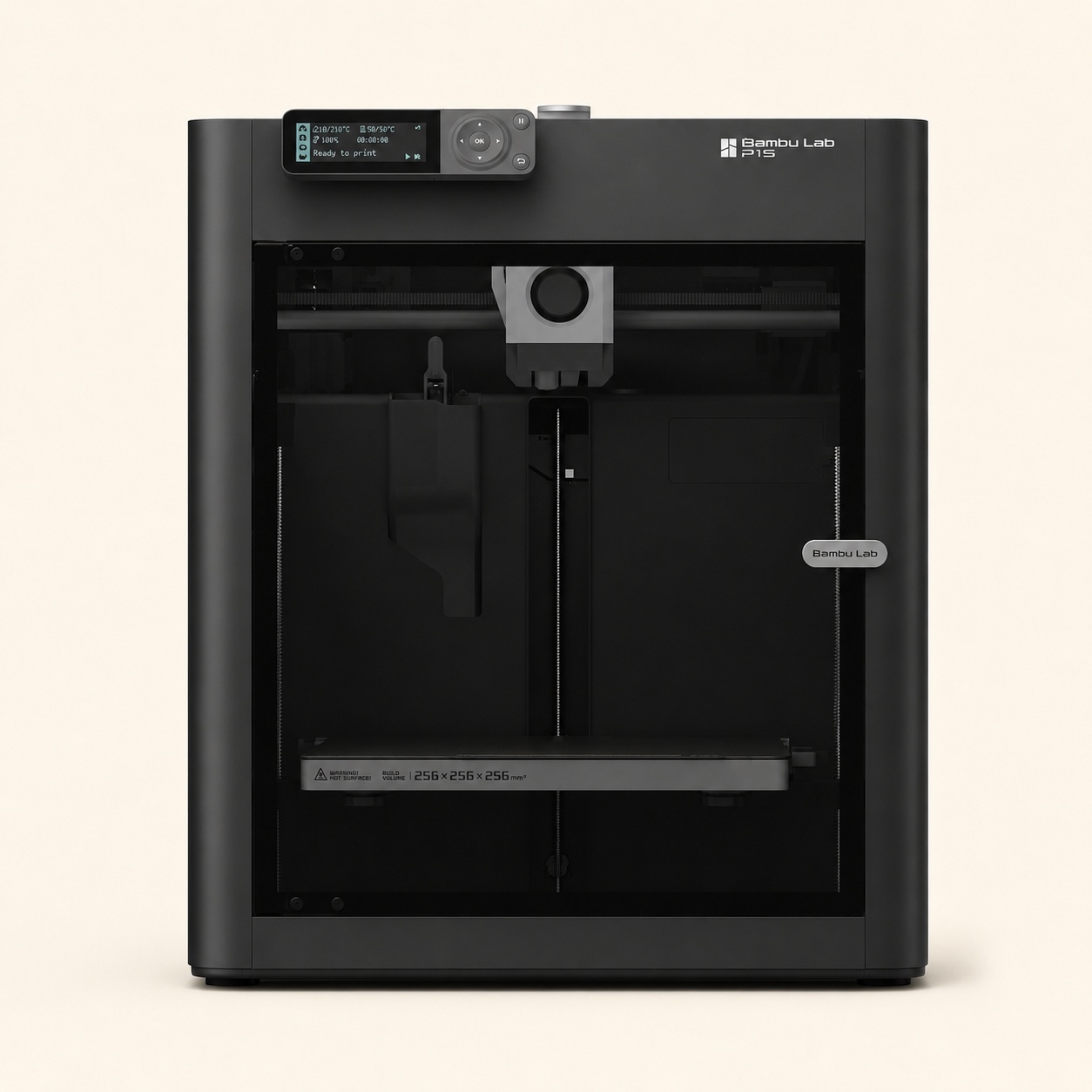
What Is the Bambu Lab P1S 3D Printer?
The Bambu Lab P1S 3D Printer is an enclosed CoreXY FDM/FFF 3D printer designed for fast and versatile desktop 3D printing.
It has a 256 × 256 × 256 mm build volume, giving users enough space for a wide variety of prototypes, functional components, models, fixtures, customized products, and creative projects.
Its enclosed structure is one of its most important characteristics. Compared with an open-frame printer, an enclosed platform can provide a more controlled printing environment for materials and applications that benefit from greater temperature stability.
The P1S is particularly suitable for users looking for a combination of:
- High-speed 3D printing
- Enclosed printer design
- 256 × 256 × 256 mm build volume
- Automated bed leveling
- Direct-drive extrusion
- Multi-color printing potential with AMS
- Remote monitoring and control features
- Bambu Studio software integration
- Professional and business applications
For buyers comparing different Bambu Lab printers, the P1S occupies an attractive position between entry-level open-frame machines and more premium or specialized systems.
Bambu Lab P1S 3D Printer
The Bambu Lab P1S 3D Printer is an enclosed CoreXY 3D printer with a 256 × 256 × 256 mm build volume and a stated maximum toolhead speed of up to 500 mm/s. It is designed for fast desktop printing and supports Bambu Lab’s AMS ecosystem for compatible multi-color and multi-filament workflows.
It is worth considering for:
- Advanced hobbyists
- Designers
- Engineers
- Architects
- Product developers
- Startups
- Educational institutions
- Professional users
- Businesses using rapid prototyping
If you want to buy a Bambu Lab P1S in Delhi, contact Paradise 3D to confirm current stock, configuration options, and the latest quotation.
Bambu Lab P1S Specs & Specifications
Understanding the technical specifications is important before choosing any 3D printer.
Here is a quick overview of key Bambu Lab P1S specs:
| Specification | Bambu Lab P1S |
|---|---|
| Printing Technology | FDM/FFF |
| Motion System | CoreXY |
| Build Volume | 256 × 256 × 256 mm |
| Printer Design | Enclosed |
| Maximum Toolhead Speed | Up to 500 mm/s |
| Maximum Hotend Temperature | Up to 300°C |
| Extruder | Direct Drive |
| Automatic Bed Leveling | Yes |
| Multi-Color Capability | Available with compatible AMS configuration |
| Software | Bambu Studio |
| Connectivity | Wi-Fi and supported connectivity options |
| Best For | Advanced Hobbyists, Professionals, Prototyping & Business Applications |
Technical capabilities can vary depending on hardware configuration, filament, nozzle, build plate, slicer settings, and accessories.
Always verify compatibility for your exact intended material and application before purchasing.
Bambu Lab P1S Build Volume – How Much Can You Print?
The Bambu Lab P1S build volume is 256 × 256 × 256 mm.
Build volume determines the maximum space available for creating an individual print.
This size makes the P1S suitable for many:
- Functional prototypes
- Product housings
- Mechanical components
- Architectural models
- Engineering prototypes
- Jigs and fixtures
- Customized products
- Decorative objects
- Educational models
- Medium-sized functional parts
Larger designs can also sometimes be divided into multiple printable sections and assembled after printing.
When choosing a 3D printer, compare your typical part dimensions with the usable build volume rather than selecting a machine based only on overall printer size.
Bambu Lab P1S Price in India
The Bambu Lab P1S price in India can vary according to the selected configuration, current availability, included accessories, seller terms, and whether you choose a standard P1S or a Combo configuration.
Because pricing and stock can change, Paradise 3D recommends requesting a current quotation rather than relying on outdated price references.
What Can Affect the Total P1S Purchase Cost?
Consider factors such as:
- Standard P1S or Combo configuration
- AMS requirement
- Filament
- Nozzle and hotend requirements
- Build plates
- Accessories
- Spare and maintenance components
- Delivery requirements
- Applicable warranty terms
- Technical support requirements
A lower initial printer price does not necessarily mean the lowest total setup cost.
The right approach is to determine what your application requires first and then select the appropriate printer configuration.
Get the Latest Bambu Lab P1S Price
Contact Paradise 3D to check:
- Latest Bambu Lab P1S price information
- Current availability
- Standard P1S configuration
- P1S Combo options
- Compatible accessories
- Filament options
- Purchase and delivery information
Bambu Lab P1S vs P1S Combo – What Is the Difference?
A common question among buyers is whether to choose the standard Bambu Lab P1S or the Bambu Lab P1S Combo.
The key buying consideration is whether you need the additional filament-management and multi-color capabilities provided by a compatible AMS setup.
Bambu Lab P1S Standard
The standard P1S is suitable for users whose primary requirement is conventional single-filament 3D printing.
Consider the standard P1S if:
- You mainly print using one filament at a time
- Multi-color printing is not essential
- You want an enclosed CoreXY printer
- You primarily produce prototypes or functional parts
- You prefer to add compatible accessories later if needed
Bambu Lab P1S Combo
The P1S Combo is aimed at users who want an integrated workflow with Bambu Lab’s Automatic Material System.
It can be useful for:
- Multi-color models
- Multi-filament projects
- Creative designs
- Branded products
- Educational models
- Visual prototypes
- Automated filament-management workflows
Buy P1S or P1S Combo?
Choose the standard P1S if most of your work involves straightforward single-filament printing.
Consider the P1S Combo if multi-color printing or automated filament management is important to your workflow.
Before purchasing, compare the current package contents and compatible AMS configuration carefully.
What Is Bambu Lab AMS?
AMS stands for Automatic Material System.
It is part of Bambu Lab’s filament-management ecosystem and can enable compatible printers to automatically manage multiple filament inputs.
Depending on the setup and print project, AMS can be useful for:
- Multi-color printing
- Automated filament switching
- Filament organization
- Creative models
- Color-coded prototypes
- Branded parts
For example, a model containing multiple colors can be prepared in compatible slicing software so the printing workflow switches between selected filaments as required.
However, multi-color printing can increase total print time and material consumption because filament changes may require purging.
Users who primarily print functional single-color parts may not need AMS for every application.
Why Choose the Bambu Lab P1S 3D Printer?
The P1S combines several features that make it attractive to advanced home users, professionals, and businesses.
1. Enclosed CoreXY Design
The enclosed design is one of the P1S’s major advantages.
An enclosure can help provide a more controlled environment than an open-frame printer.
This is particularly useful when working with applications or materials that benefit from greater environmental stability during printing.
The CoreXY motion architecture also supports fast toolhead movement while keeping the overall system compact.
2. High-Speed 3D Printing
The P1S is designed for high-speed desktop printing, with a stated maximum toolhead speed of up to 500 mm/s.
For businesses and product developers, faster printing can help reduce turnaround time when creating multiple design iterations.
However, maximum speed does not mean every model should always be printed at the highest possible setting.
Actual print speed depends on:
- Model geometry
- Material
- Layer height
- Nozzle
- Cooling
- Acceleration
- Surface-quality requirements
- Supports
- Slicer settings
A successful print requires the right balance between speed, quality, material behavior, and dimensional accuracy.
3. Automatic Bed Leveling
Proper first-layer calibration is critical for successful FDM 3D printing.
The P1S includes automated bed-leveling functionality designed to simplify printer preparation.
Automation can reduce repetitive manual setup, making everyday operation more convenient for both experienced users and people moving from more traditional manual 3D printers.
4. Direct-Drive Extrusion
A direct-drive extrusion system keeps the filament-driving mechanism close to the hotend.
This design can provide more controlled filament feeding and is useful across a range of compatible printing applications.
Actual material performance still depends on the filament, printer configuration, settings, and manufacturer recommendations.
5. Enclosed Printing Environment
The P1S enclosure is an important reason many users compare it with open-frame Bambu Lab printers.
An enclosed design can be beneficial for:
- More stable printing conditions
- Reduced exposure to external drafts
- Certain temperature-sensitive printing applications
- A more contained machine environment
An enclosure does not automatically make every material suitable.
Always consider ventilation, material emissions, nozzle/hotend compatibility, build surface, and manufacturer guidance.
6. Multi-Color Printing with AMS
With a compatible AMS setup, the P1S can support automated filament-management workflows useful for multi-color printing.
Applications include:
- Decorative objects
- Character models
- Product mockups
- Educational models
- Branded designs
- Signs
- Color-coded prototypes
This makes the P1S attractive to users who want both functional printing and more creative multi-color capabilities.
7. Integrated Bambu Lab Ecosystem
The P1S works within Bambu Lab’s integrated hardware and software environment.
Bambu Studio can be used to prepare 3D models for printing and manage settings such as:
- Layer height
- Infill
- Supports
- Print speed
- Material profiles
- Part orientation
- Temperature
- Multi-color assignments
An integrated workflow can simplify the process from digital model to finished physical object.
What Materials Can the Bambu Lab P1S Print?
Material capability is one of the important considerations when choosing the P1S.
Depending on the exact hardware setup, manufacturer recommendations, and printing conditions, the P1S can work with a range of common and more demanding 3D printing filaments.
PLA
PLA is commonly used for:
- Prototypes
- Decorative models
- Educational projects
- Display parts
- Concept models
It is often one of the easiest materials for general desktop 3D printing.
PETG
PETG is useful when greater durability or practical functionality is required.
Applications can include:
- Functional parts
- Brackets
- Containers
- Workshop components
- Everyday-use products
TPU
TPU is a flexible material suitable for applications such as:
- Flexible components
- Protective parts
- Grips
- Soft functional items
Printing flexible materials requires appropriate settings and filament handling.
ABS and ASA
An enclosed printer can be advantageous when working with materials such as ABS or ASA because these materials can benefit from more stable printing conditions.
They may be used for:
- Functional components
- Engineering prototypes
- Outdoor applications where appropriate
- Durable parts
Always follow current manufacturer guidance regarding ventilation, temperature, hardware requirements, and material compatibility.
Engineering Materials
Some advanced applications may require specialized or reinforced materials.
Before using demanding engineering filaments, confirm:
- Hotend compatibility
- Nozzle requirements
- Abrasion resistance requirements
- Build plate compatibility
- Recommended temperatures
- Ventilation requirements
Do not assume every filament can be printed optimally with the standard hardware configuration.
Is the Bambu Lab P1S Good for Beginners?
The Bambu Lab P1S can be suitable for beginners, particularly users who want to start with a capable enclosed printer rather than an entry-level machine.
Its automated features and integrated ecosystem can reduce some of the manual work associated with traditional 3D printers.
However, beginners should still learn:
- Filament selection
- Bed adhesion
- Slicer settings
- Supports
- Model orientation
- Nozzle maintenance
- Basic troubleshooting
- Safe material handling
If budget, compact size, and straightforward everyday printing are the main priorities, an A1-series model may also be worth comparing.
If enclosure and broader application flexibility are more important, the P1S can be a stronger fit.
Is Bambu Lab P1S Good for Professional Use?
Yes, the Bambu Lab P1S can be useful for many professional 3D printing applications, depending on part size, material, production volume, and technical requirements.
Professionals can use it for:
- Rapid prototyping
- Product development
- Design validation
- Jigs and fixtures
- Architectural models
- Engineering prototypes
- Customized parts
- Educational models
- Low-volume production applications
For professional buyers, the decision should be based on total workflow requirements rather than speed alone.
Consider:
- Required materials
- Typical part dimensions
- Print frequency
- Expected uptime
- Post-processing
- Dimensional requirements
- Maintenance
- Consumables
- Scalability
Bambu Lab P1S for Engineering & Product Development
Engineers and product-development teams can use 3D printing throughout the design process.
Applications include:
- Functional prototypes
- Enclosures
- Mechanical test parts
- Assembly-fit testing
- Jigs and fixtures
- Concept validation
- Design iteration
Material selection should match the intended testing conditions.
A visual prototype printed in PLA may have very different requirements from a functional component exposed to heat, load, chemicals, or outdoor environments.
Bambu Lab P1S for Rapid Prototyping
Rapid prototyping is one of the strongest use cases for desktop 3D printing.
Designers and engineers can turn CAD models into physical prototypes without immediately investing in traditional manufacturing tooling.
The P1S can help teams test:
- Shape
- Fit
- Assembly
- Ergonomics
- Dimensions
- Product concepts
- Design revisions
Faster iteration can help identify design issues earlier in the product-development process
Bambu Lab P1S for Business & Small-Scale Production
Businesses can use the P1S for more than prototypes.
Possible applications include:
- Custom products
- Manufacturing aids
- Jigs
- Fixtures
- Replacement components
- Product samples
- Customized parts
- Small production batches
Before using any desktop printer for production, calculate:
- Print time per part
- Material cost
- Failure rate
- Labor
- Maintenance
- Post-processing
- Quality-control requirements
For higher production volumes, multiple machines or a dedicated print-farm workflow may be more appropriate than relying on a single printer.
Bambu Lab P1S vs A1 Mini – Which Is Better?
The Bambu Lab P1S and A1 Mini are designed for different priorities.
| Feature | Bambu Lab A1 Mini | Bambu Lab P1S |
|---|---|---|
| Design | Compact Open-Frame | Enclosed CoreXY |
| Build Volume | 180 × 180 × 180 mm | 256 × 256 × 256 mm |
| Best For | Beginners & Smaller Projects | Advanced & Professional Applications |
| Workspace | More Compact | Larger Footprint |
| Multi-Color | Compatible AMS Lite Workflow | Compatible AMS Workflow |
| Material Flexibility | Everyday Desktop Materials | Broader Application Potential |
| Typical User | Beginner/Hobbyist | Advanced Hobbyist/Professional |
Choose A1 Mini If:
- You have limited workspace
- You mainly print smaller models
- You are starting with desktop 3D printing
- Your primary materials are suited to an open-frame workflow
Choose P1S If:
- You want an enclosed printer
- You need a larger build volume
- You have broader material requirements
- You plan professional or business applications
- You want greater flexibility for future projects
Neither printer is universally better. The correct choice depends on your application.
Applications of Bambu Lab 3D Printers
Bambu Lab P1S vs A1 – Which Should You Buy?
Both printers offer modern Bambu Lab workflows, but their design philosophy differs.
The A1 is an open-frame bed-slinger platform, while the P1S uses an enclosed CoreXY architecture.
Consider the A1 If:
- Your focus is common everyday materials
- You prefer an open-frame platform
- You do not require an enclosure
- Your applications fit the A1 workflow
Consider the P1S If:
- Enclosed printing is important
- You expect broader material requirements
- CoreXY architecture is preferable for your workflow
- You want a machine positioned toward advanced or professional applications
Compare the latest specifications, material compatibility, and total setup before purchasing.
Bambu Lab P1S vs X1C
The P1S and X1 Carbon (X1C) are often compared because both use an enclosed CoreXY format and similar build-volume class.
The P1S is attractive to users who want strong core printing capabilities without necessarily requiring every premium feature found in a higher-tier system.
The X1C is positioned toward users who value additional advanced hardware and monitoring capabilities.
Consider P1S If:
- You want an enclosed high-speed CoreXY printer
- You prioritize value and core printing capability
- You do not require every premium feature
Consider X1C If:
- Advanced sensing and monitoring features are important
- Your workflow requires its additional hardware capabilities
- Premium functionality justifies the higher investment for your application
Always compare the current specifications of both models before deciding.
Why Buy Bambu Lab P1S in Delhi from Paradise 3D?
Buying a 3D printer is not just about selecting the machine with the longest specification list.
The printer should match your actual application.
Paradise 3D helps buyers evaluate the Bambu Lab P1S according to their printing requirements.
Product Selection Guidance
Before buying, consider:
- What will you print?
- What materials will you use?
- What is your typical part size?
- How frequently will you print?
- Do you need multi-color printing?
- Is AMS required?
- Is the printer for personal or business use?
Understanding these requirements makes it easier to choose an appropriate configuration.
Compare Standard and Combo Options
Paradise 3D can help you understand the difference between available P1S configurations so you can avoid paying for features that may not be necessary—or buying a setup that does not meet your future requirements.
Solutions for Different Users
The P1S can be relevant for:
- Designers
- Engineers
- Architects
- Startups
- Educational institutions
- Makers
- Product-development teams
- Businesses
- Advanced hobbyists
Current Product Information
Contact Paradise 3D to check current:
- Bambu Lab P1S availability
- Configuration options
- P1S Combo options
- Compatible accessories
- Purchase information
- Latest quotation
Bambu Lab P1S Setup – Getting Started
After receiving your P1S, correct setup is important for safe and reliable printing.
- Unbox the Printer Carefully
Remove protective packaging and shipping restraints according to the official setup instructions.
- Position the Printer Correctly
Place the P1S on a stable surface with adequate clearance and appropriate ventilation for the materials you plan to use.
- Install Bambu Studio
Install the compatible Bambu Lab software and select the correct printer profile.
- Complete Initial Calibration
Follow the printer’s recommended calibration procedure.
- Load Compatible Filament
Use an appropriate filament and select the correct material profile.
- Start a Test Print
Begin with a simple test model and monitor initial layers to confirm correct adhesion and printer behavior.
Always follow the latest official setup, maintenance, and safety documentation.
Buy Bambu Lab P1S in Delhi
Planning to buy Bambu Lab P1S in Delhi?
Follow a requirement-based buying process.
Step 1: Define Your Application
Identify what you plan to print and whether the machine will be used for hobby, education, prototyping, professional, or business purposes.
Step 2: Check Your Material Requirements
Determine which filaments you expect to use.
This can affect printer configuration, nozzle selection, build surface, and ventilation requirements.
Step 3: Decide Whether You Need AMS
If you require compatible multi-color or automated filament-management workflows, compare the appropriate AMS configuration.
Step 4: Choose Standard or Combo
Select the configuration that matches your workflow instead of choosing solely based on initial price.
Step 5: Request Current Price & Availability
Contact Paradise 3D for the latest quotation and stock information.
Step 6: Confirm Warranty & Included Components
Before ordering, verify:
- Exact model
- Package contents
- Accessories
- Warranty terms
- Delivery conditions
- Support information
Contact Paradise 3D to check Bambu Lab P1S availability in Delhi and request a current quotation.
Bambu Lab P1S 3D Printer in Delhi
If you are searching for a Bambu Lab P1S 3D Printer in Delhi, Paradise 3D can help you evaluate the machine based on your intended use rather than selecting a printer solely from online specifications.
The P1S can be considered for Delhi-based:
- Design studios
- Engineering companies
- Architecture firms
- Startups
- Educational institutions
- Product-development teams
- Makers
- Small businesses
- Professional users
Before purchasing, discuss your project requirements, materials, expected print volume, and multi-color needs.
This can help determine whether the P1S standard configuration, P1S Combo, or another Bambu Lab model is a better match.
What Our Clients Say
Rated ★★★★★ on Google by 80+ happy customers for our quality, service, and reliability.
EXCELLENTTrustindex verifies that the original source of the review is Google. Helped us design and manufacture a new product. Supportive staff and high quality services.Posted onTrustindex verifies that the original source of the review is Google. NicePosted onTrustindex verifies that the original source of the review is Google. 2 year'sPosted onTrustindex verifies that the original source of the review is Google. Unser Unternehmen in Deutschland wandte sich an 3D Paradise für die Entwicklung neuer Produkte und kundenspezifischer Lösungen für den europäischen Markt. Das Unternehmen 3D Paradise mit Sitz in Delhi setzte unsere Ideen und Konzepte in ergonomisches 3D-Cad-Design um und realisierte einen Prototyp für uns, der jetzt ein hervorragendes Produkt auf dem europäischen Markt ist. 3D Paradise bietet wirklich schnelle, kosteneffiziente und qualitative Lösungen für Ihre Ideen und Designs. Dieses Unternehmen hat die Kompetenz, Ihre Probleme zu lösen und Ihre Konzepte und Ideen in reale Produkte umzusetzen. Wir sind sehr zufrieden mit dem Engagement von 3D Paradise und streben eine lange, fruchtbare Geschäftsbeziehung an.
Frequently Asked Questions
The Bambu Lab P1S is an enclosed CoreXY FDM/FFF 3D printer with a 256 × 256 × 256 mm build volume, high-speed printing capabilities, automated bed leveling, and compatibility with Bambu Lab’s AMS ecosystem.
The Bambu Lab P1S price in India varies depending on configuration, current availability, included accessories, seller terms, and whether you choose a standard or Combo setup. Contact Paradise 3D for the latest quotation.
You can contact Paradise 3D to enquire about Bambu Lab P1S availability in Delhi, current configurations, Combo options, and purchase information.
The Bambu Lab P1S has a 256 × 256 × 256 mm build volume.
Bambu Lab states a maximum toolhead speed of up to 500 mm/s. Actual print speed depends on the model, filament, layer height, quality requirements, acceleration, and slicer settings.
Yes. The P1S has an enclosed design, which provides a more controlled printing environment than an open-frame printer.
The key difference is the included filament-management configuration. A Combo setup is intended for users who want compatible AMS capabilities such as automated filament handling and multi-color workflows.
Yes, the P1S can support compatible multi-color printing workflows when paired with an appropriate Bambu Lab AMS configuration.
Yes, it can be suitable for beginners who want to start with a capable enclosed printer. Automated features simplify parts of the workflow, although users should still learn basic slicing, materials, maintenance, and safe printing practices.
Yes. It can be used for rapid prototyping, product development, engineering models, jigs and fixtures, customized products, and other professional applications where its build volume and material capabilities are appropriate.
The A1 Mini is more compact and oriented toward smaller everyday projects, while the P1S provides a larger build volume and enclosed CoreXY platform. The better choice depends on your application, materials, workspace, and budget.
The P1S offers strong enclosed CoreXY printing capabilities, while the X1C adds higher-tier hardware and monitoring features. Choose according to whether those additional capabilities provide meaningful value for your workflow.
Depending on configuration and manufacturer recommendations, the P1S can work with common materials such as PLA, PETG, TPU, ABS, ASA, and other compatible filaments. Some specialized materials may require specific nozzle or hardware configurations.
The P1S includes network-connected functionality within the Bambu Lab ecosystem. Available connectivity and features should be checked against the current regional product specifications and firmware.
Choose an AMS configuration if multi-color printing or automated multi-filament management is important to your workflow. If you primarily print single-color functional parts, you may not need AMS initially.
Contact Paradise 3D
Looking for a Bambu Lab P1S in Delhi? Paradise 3D can help you explore the P1S based on your project requirements, preferred materials, expected print volume, multi-color needs, and professional or business applications.
Whether you are checking the Bambu Lab P1S price in India, comparing P1S vs P1S Combo, researching Bambu Lab P1S specs, or planning to buy a Bambu Lab P1S 3D Printer in Delhi, start by selecting a configuration that matches what you actually intend to print.
Clients We Serve