
Bambu Lab P2S 3D Printer
Looking for a Bambu Lab P2S 3D printer for professional 3D printing, rapid prototyping, product development, engineering, or business applications? Paradise 3D helps customers explore the Bambu Lab P2S, compare configurations, and choose a suitable 3D printing setup according to their applications, materials, and workflow requirements.
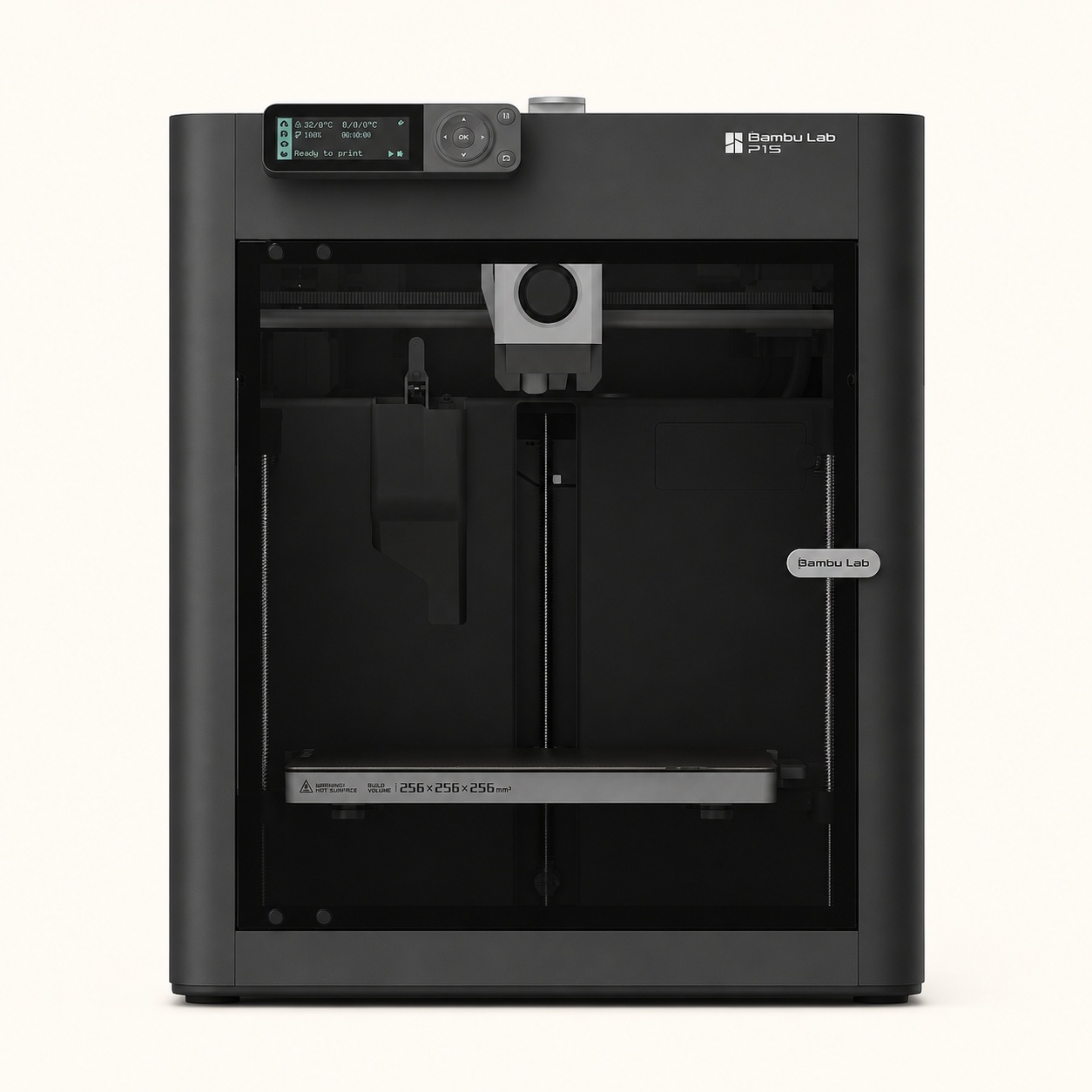
The Bambu Lab P2S 3D Printer builds on the P-series platform with an enclosed CoreXY architecture, a 256 × 256 × 256 mm build volume, improved monitoring, a quick-swap hotend design, and compatibility with Bambu Lab’s multi-material ecosystem.
For users interested in automated multi-color and filament-management workflows, the Bambu Lab P2S Combo can be paired with the AMS 2 Pro system.
Whether you are checking the latest Bambu Lab P2S price in India, researching its specifications, comparing P1S vs P2S, or planning to buy a Bambu Lab P2S in Delhi, understanding your printing requirements before purchase will help you select the right configuration.
Contact Paradise 3D to check current Bambu Lab P2S availability and request the latest quotation.
[ Upload File ] (Supports STL • OBJ • STEP • 3MF • IGES • SolidWorks • Fusion 360)
Book a call With Expert
What Is the Bambu Lab P2S?
The Bambu Lab P2S is an enclosed CoreXY FDM/FFF 3D printer developed as part of Bambu Lab’s P-series.
It is designed for users who want a combination of fast desktop 3D printing, automated workflow features, enclosed printing, advanced monitoring, and multi-material capabilities through compatible AMS configurations.
The P2S has a 256 × 256 × 256 mm build volume, making it suitable for a broad range of medium-sized prints.
It can be considered for:
- Rapid prototyping
- Product development
- Engineering models
- Functional components
- Architectural models
- Educational projects
- Jigs and fixtures
- Customized products
- Creative multi-color models
- Professional 3D printing
- Small-scale production
Its enclosed CoreXY architecture makes the P2S particularly relevant to users looking for a professional desktop platform rather than a basic entry-level open-frame printer.
Bambu Lab P2S 3D Printer
The Bambu Lab P2S is an enclosed CoreXY 3D printer with a 256 × 256 × 256 mm build volume, up to 300°C maximum nozzle temperature, quick-swap hotend design, enhanced monitoring features, and compatibility with Bambu Lab’s AMS ecosystem. The P2S Combo includes an AMS 2 Pro configuration for advanced filament management and multi-color printing workflows.
It is particularly relevant for:
- Advanced makers
- Designers
- Engineers
- Product developers
- Architecture professionals
- Startups
- Educational institutions
- Professional users
- Businesses
If you want to buy Bambu Lab P2S in Delhi, contact Paradise 3D to check current availability, configuration options, and the latest quotation.
Bambu Lab P2S Specs & Specifications
Before purchasing a 3D printer, compare specifications according to your actual application rather than looking at only one feature.
Here is a quick overview of important Bambu Lab P2S specs:
| Specification | Bambu Lab P2S |
|---|---|
| Printing Technology | FDM/FFF |
| Motion Architecture | CoreXY |
| Printer Design | Enclosed |
| Build Volume | 256 × 256 × 256 mm |
| Maximum Nozzle Temperature | Up to 300°C |
| Maximum Heatbed Temperature | Up to 110°C |
| Default Nozzle Diameter | 0.4 mm |
| Other Supported Nozzle Sizes | 0.2, 0.6 and 0.8 mm |
| Hotend Design | Quick-Swap |
| Filament Cutter | Built-In |
| Multi-Color Capability | Compatible with AMS Ecosystem |
| Combo System | AMS 2 Pro |
| Monitoring | Enhanced Camera & Live-View Capabilities |
| Slicing Software | Bambu Studio |
| Best For | Advanced, Professional & Business Applications |
Actual printing performance depends on the selected filament, nozzle, slicer profile, model geometry, print settings, and environmental conditions.
Always verify the exact product configuration and compatible accessories before purchasing.
Bambu Lab P2S Build Volume
The Bambu Lab P2S build volume is 256 × 256 × 256 mm.
This gives users enough printing capacity for a wide variety of desktop 3D printing applications.
Examples include:
- Product prototypes
- Functional components
- Mechanical models
- Electronic enclosures
- Architectural models
- Jigs and fixtures
- Customized products
- Educational models
- Creative designs
- Medium-sized engineering parts
For objects larger than the available build volume, designers may divide a model into multiple printable components and assemble them after printing.
When comparing printers, consider the dimensions of the parts you regularly expect to produce rather than simply choosing the largest machine available.
Bambu Lab P2S Price in India
The Bambu Lab P2S price in India can vary depending on the selected configuration, current stock, included accessories, AMS requirements, seller terms, and other purchase factors.
Because product prices and availability can change, it is better to request a current quotation instead of relying on outdated online pricing.
What Affects the Bambu Lab P2S Price?
The overall cost of your setup may depend on:
- Standard P2S or Combo configuration
- AMS 2 Pro requirements
- Filament requirements
- Nozzle options
- Build plates
- Accessories
- Spare components
- Delivery requirements
- Warranty terms
- Technical support requirements
The printer itself is only one part of a complete 3D printing workflow.
Before purchasing, determine which configuration and accessories are actually necessary for your projects.
Get the Latest Bambu Lab P2S Price
Contact Paradise 3D to check:
- Latest Bambu Lab P2S price information
- Current stock availability
- Standard configuration
- P2S Combo options
- AMS 2 Pro requirements
- Compatible accessories
- Purchase information
Bambu Lab P2S vs P2S Combo – What Is the Difference?
One important decision is whether to choose a standard Bambu Lab P2S or a Bambu Lab P2S Combo.
The main difference is the included multi-material and filament-management setup.
Bambu Lab P2S Standard
The standard P2S is suitable for users who primarily need a capable enclosed 3D printer and do not necessarily require an AMS system from the beginning.
Consider the standard configuration if:
- You primarily print with one filament at a time
- Multi-color printing is not essential
- You want an enclosed CoreXY platform
- You produce functional prototypes
- You want flexibility to expand your setup later
Bambu Lab P2S Combo
The Bambu Lab P2S Combo includes an AMS 2 Pro configuration designed to expand filament-management and multi-color capabilities.
It can be particularly useful for:
- Multi-color 3D printing
- Automated filament management
- Creative models
- Product visualization
- Branded objects
- Educational models
- Color-coded prototypes
- Multi-filament workflows
Which Should You Choose?
Choose the standard P2S if most of your work involves conventional single-filament printing and you do not currently need an automated multi-filament workflow.
Consider the P2S Combo if multi-color printing, automated filament handling, or AMS functionality is important to your projects.
Bambu Lab P2S with AMS 2 Pro
The AMS 2 Pro expands the P2S workflow by providing automated filament management.
It can help users manage multiple compatible filament spools and switch between materials or colors according to the prepared print job.
AMS 2 Pro Can Be Useful For:
- Multi-color printing
- Automated filament switching
- Filament storage and management
- Creative models
- Branded products
- Educational projects
- Visual prototypes
- Color-coded components
The system also introduces enhanced filament-drying functionality designed to improve filament storage and preparation.
Properly managed filament can help reduce printing problems associated with moisture-sensitive materials.
However, buyers should remember that multi-color printing can increase:
- Total print time
- Filament consumption
- Purge material
- Workflow complexity
If you mainly produce single-color functional components, evaluate whether an AMS configuration provides enough value for your specific use case.
Why Choose the Bambu Lab P2S 3D Printer?
The P2S introduces several features aimed at improving the P-series printing experience.
1. Enclosed CoreXY Architecture
The P2S uses an enclosed CoreXY platform.
CoreXY architecture is widely used in high-speed desktop 3D printers because it allows rapid toolhead movement while keeping the overall mechanical structure relatively compact.
The enclosure can also provide a more controlled printing environment compared with an open-frame machine.
This can be useful for:
- Professional workflows
- Functional prototypes
- Certain temperature-sensitive materials
- Reducing exposure to external drafts
- Maintaining more stable printing conditions
Material-specific ventilation and safety requirements should still be followed.
2. 256 × 256 × 256 mm Build Volume
The P2S offers a practical balance between desktop size and usable build capacity.
A 256 × 256 × 256 mm build volume is sufficient for many:
- Engineering prototypes
- Product designs
- Functional components
- Architectural models
- Customized products
- Creative projects
This makes the machine versatile without moving into a significantly larger industrial-style footprint.
3. Quick-Swap Hotend Design
The Bambu Lab P2S features a quick-swap hotend system designed to make nozzle changes and maintenance more convenient.
Different nozzle diameters can serve different printing priorities.
For example:
Smaller nozzles can be useful when fine detail is important.
Standard nozzles provide a balance between detail and printing speed.
Larger nozzles can help increase material flow for suitable larger or faster prints.
Choose a nozzle based on the type of models you regularly produce.
4. Up to 300°C Nozzle Temperature
The P2S supports a maximum nozzle temperature of up to 300°C.
Higher nozzle-temperature capability can expand the range of compatible printing applications.
However, nozzle temperature alone does not determine whether a material can be printed successfully.
Also consider:
- Nozzle material
- Build plate
- Chamber conditions
- Filament recommendations
- Abrasion resistance
- Ventilation
- Drying requirements
Always follow the latest material and hardware compatibility guidance.
5. Enhanced Monitoring
observation clearer.
This can be useful for users who want to:
- Check print progress
- Monitor longer projects
- Capture timelapses
- Observe print behavior remotely
Remote monitoring is particularly useful in professional environments where users may run longer print jobs.
It should not replace appropriate equipment supervision or safe operating practices.
6. Multi-Color Printing Capabilities
When used with a compatible AMS configuration, the P2S can support automated multi-color printing.
Possible applications include:
- Character models
- Decorative objects
- Educational models
- Branded products
- Signage
- Color-coded prototypes
- Creative designs
Multi-color printing can significantly expand creative possibilities, although it may also increase printing time and material usage.
7. Smart Sensor System
The P2S incorporates multiple sensors designed to support monitoring and printing reliability.
These include systems related to areas such as:
- Door status
- Filament run-out
- Filament tangling
- Filament movement
- Power-loss recovery
Automated detection features can help simplify everyday operation, but users should still perform routine maintenance and monitor critical print jobs appropriately.
What Materials Can the Bambu Lab P2S Print?
The best filament depends on what the final part needs to do.
Depending on printer configuration and manufacturer recommendations, users may work with a range of compatible materials.
PLA
PLA is commonly used for:
- Prototypes
- Decorative models
- Educational projects
- Concept models
- Display pieces
It is one of the most accessible materials for general 3D printing.
PETG
PETG offers a useful balance of durability and printability.
Applications may include:
- Functional parts
- Brackets
- Containers
- Workshop components
- Practical everyday objects
TPU
TPU is used when flexibility is required.
Examples include:
- Flexible components
- Grips
- Protective parts
- Soft functional products
ABS and ASA
The enclosed architecture can be useful for applications involving materials such as ABS or ASA, which may benefit from more stable printing conditions.
Possible uses include:
- Functional components
- Engineering prototypes
- Durable parts
- Suitable outdoor-use applications
Engineering Filaments
Advanced users may also consider specialized engineering materials where supported.
Before printing abrasive, reinforced, or higher-temperature materials, confirm:
- Nozzle compatibility
- Hotend requirements
- Build surface
- Drying requirements
- Recommended temperatures
- Ventilation requirements
Not every material should be used with every hardware configuration.
Is the Bambu Lab P2S Good for Professional Use?
Yes. The Bambu Lab P2S is designed to support a wide range of professional desktop 3D printing applications.
Potential applications include:
- Rapid prototyping
- Product development
- Engineering models
- Design validation
- Jigs and fixtures
- Architectural models
- Customized components
- Small-batch production
- Educational and research projects
Professional users should evaluate more than printer speed.
Important factors include:
- Material compatibility
- Part dimensions
- Required tolerances
- Production volume
- Maintenance
- Consumables
- Post-processing
- Workflow scalability
Bambu Lab P2S for Rapid Prototyping
Rapid prototyping allows designers and engineers to convert digital CAD models into physical parts quickly.
The P2S can help teams evaluate:
- Shape
- Fit
- Assembly
- Dimensions
- Ergonomics
- Product concepts
- Design revisions
This allows potential design problems to be identified before investing in more expensive manufacturing methods.
Bambu Lab P2S for Engineering
Engineering teams can use desktop 3D printing for:
- Functional prototypes
- Test components
- Enclosures
- Jigs
- Fixtures
- Assembly aids
- Concept validation
The correct filament should always be selected according to mechanical, thermal, chemical, and environmental requirements.
Bambu Lab P2S for Business
Businesses can use the P2S for both development and selected production applications.
Examples include:
- Customized products
- Product prototypes
- Manufacturing aids
- Replacement components
- Product samples
- Low-volume components
- Visual models
Before using a 3D printer for commercial production, calculate:
- Printing time
- Material consumption
- Labor
- Maintenance
- Failure rates
- Post-processing
- Quality control
For higher production volumes, a multi-printer workflow may be more suitable.
Bambu Lab P1S vs P2S – Which Is Better?
The Bambu Lab P1S vs P2S comparison is particularly important for buyers deciding whether to choose the established P1S or the newer P2S platform.
Both belong to Bambu Lab’s enclosed P-series, but the P2S introduces a reengineered workflow with newer hardware and usability improvements.
| Feature | Bambu Lab P1S | Bambu Lab P2S |
|---|---|---|
| Architecture | Enclosed CoreXY | Enclosed CoreXY |
| Build Volume | 256 × 256 × 256 mm | 256 × 256 × 256 mm |
| Product Generation | Earlier P-Series | Newer Reengineered P-Series |
| Hotend Workflow | Established P1 Platform | Quick-Swap Hotend Design |
| Monitoring | Standard P1S System | Enhanced Live-View System |
| Multi-Material | Compatible AMS Ecosystem | Compatible Newer AMS Ecosystem |
| Best For | Value-Oriented Professional Printing | Buyers Wanting Newer P-Series Features |
Choose P1S If:
- It meets all your required printing applications
- You want an established enclosed P-series platform
- Your priority is core printing capability
- You do not require the newer P2S improvements
Choose P2S If:
- You prefer the newer P-series platform
- Quick-swap hotend convenience is valuable
- Enhanced monitoring is important
- You want to use newer AMS ecosystem capabilities
- You are building a more current professional workflow
The better printer depends on your application and budget rather than model age alone.
Bambu Lab P2S vs X1C
Buyers may also compare the Bambu Lab P2S vs X1 Carbon (X1C).
Both target advanced desktop 3D printing, but they occupy different positions within the Bambu Lab ecosystem.
When comparing them, evaluate:
- Sensor systems
- Monitoring
- Hardware configuration
- Material requirements
- Nozzle and extrusion system
- AMS requirements
- Total setup cost
- Professional workflow needs
Choose based on the capabilities your projects actually require rather than simply selecting the higher-tier model.
Bambu Lab P2S vs H2S
The P2S vs H2S comparison becomes relevant for users deciding between a more compact P-series machine and a larger, higher-capability H-series platform.
Consider P2S If:
- A 256 × 256 × 256 mm build volume meets your requirements
- You want a compact enclosed CoreXY platform
- Desktop footprint matters
- Your projects fit within P-series capabilities
Consider H2S If:
- You regularly require larger prints
- Your professional workflow needs greater build capacity
- Advanced H-series capabilities are important
- Your projects justify a larger machine
Do not choose based solely on which model is newer or larger. Match the machine to your typical project size and material requirements.
Why Buy Bambu Lab P2S in Delhi from Paradise 3D?
If you are planning to buy Bambu Lab P2S in Delhi, selecting the correct configuration is an important part of the purchase.
Paradise 3D helps customers evaluate 3D printers according to their actual requirements.
Requirement-Based Product Guidance
Before purchasing, consider:
- What will you print?
- What size are your typical parts?
- Which materials will you use?
- How frequently will the printer operate?
- Do you need multi-color printing?
- Is AMS 2 Pro required?
- Is the printer for hobby, professional, educational, or business use?
These questions can help determine whether the P2S is the right model and which configuration is most suitable.
Compare Standard and Combo Configurations
Paradise 3D can help buyers understand the differences between available configurations before purchase.
This can help avoid buying unnecessary accessories or selecting a setup that does not meet future requirements.
Suitable for Different Users
The P2S can be relevant for:
- Designers
- Engineers
- Architects
- Product developers
- Startups
- Educational institutions
- Makers
- Professional users
- Businesses
Current Product Information
Contact Paradise 3D to check:
- P2S availability
- Current configurations
- P2S Combo options
- AMS 2 Pro information
- Compatible accessories
- Latest quotation
Buy Bambu Lab P2S 3D Printer
Planning to buy Bambu Lab P2S in Delhi? Use this simple buying process.
Contact Paradise 3D to check Bambu Lab P2S availability in Delhi and request the latest quotation.
Step 1: Define Your Application
Identify whether the printer will be used for:
- Prototyping
- Engineering
- Education
- Creative printing
- Professional work
- Business production
Step 2: Determine Your Material Requirements
Identify which filaments you plan to use.
This affects nozzle selection, build surface, printer settings, and overall configuration.
Step 3: Decide Whether You Need Multi-Color Printing
If multi-color printing or automated filament management is important, evaluate the P2S Combo and compatible AMS setup.
Step 4: Compare Standard vs Combo
Select the configuration that matches your workflow.
Do not choose the Combo solely because it includes more hardware if you do not need its capabilities.
Step 5: Request Current Price & Availability
Contact Paradise 3D for the latest Bambu Lab P2S price in India, current Delhi availability, and configuration information.
Step 6: Confirm Package & Warranty Details
Before ordering, verify:
- Exact model
- Package contents
- AMS configuration
- Accessories
- Warranty terms
- Delivery conditions
- Support information
Bambu Lab P2S 3D Printer in Delhi
If you are searching for a Bambu Lab P2S 3D Printer in Delhi, Paradise 3D can help you explore available configurations according to your intended application.
The P2S can be considered for Delhi-based:
- Engineering companies
- Design studios
- Architecture firms
- Product-development teams
- Educational institutions
- Startups
- Makers
- Manufacturing businesses
- Professional 3D printing users
Before purchasing, compare your material requirements, average part dimensions, expected print frequency, and multi-color needs.
This will help determine whether the P2S standard configuration, P2S Combo, or another Bambu Lab model is better suited to your workflow.
How to Set Up the Bambu Lab P2S 3D Printer
Correct initial setup helps ensure a reliable printing experience.
1. Unbox Carefully
Remove all packaging and transportation restraints according to the official instructions.
2. Position the Printer
Place the machine on a stable surface with adequate operating clearance and appropriate ventilation.
3. Install Bambu Studio
Install the compatible Bambu Lab slicing software and select the correct P2S printer profile.
4. Complete Initial Setup and Calibration
Follow the printer’s recommended setup and calibration process.
5. Load Compatible Filament
Use a suitable filament and select the correct material profile.
6. Run a Test Print
Start with a simple model to confirm bed adhesion, extrusion, calibration, and overall printer behavior.
Always follow current official setup, maintenance, and safety instructions.
What Our Clients Say
Rated ★★★★★ on Google by 80+ happy customers for our quality, service, and reliability.
EXCELLENTTrustindex verifies that the original source of the review is Google. Helped us design and manufacture a new product. Supportive staff and high quality services.Posted onTrustindex verifies that the original source of the review is Google. NicePosted onTrustindex verifies that the original source of the review is Google. 2 year'sPosted onTrustindex verifies that the original source of the review is Google. Unser Unternehmen in Deutschland wandte sich an 3D Paradise für die Entwicklung neuer Produkte und kundenspezifischer Lösungen für den europäischen Markt. Das Unternehmen 3D Paradise mit Sitz in Delhi setzte unsere Ideen und Konzepte in ergonomisches 3D-Cad-Design um und realisierte einen Prototyp für uns, der jetzt ein hervorragendes Produkt auf dem europäischen Markt ist. 3D Paradise bietet wirklich schnelle, kosteneffiziente und qualitative Lösungen für Ihre Ideen und Designs. Dieses Unternehmen hat die Kompetenz, Ihre Probleme zu lösen und Ihre Konzepte und Ideen in reale Produkte umzusetzen. Wir sind sehr zufrieden mit dem Engagement von 3D Paradise und streben eine lange, fruchtbare Geschäftsbeziehung an.
Frequently Asked Questions
The Bambu Lab P2S 3D Printer is an enclosed CoreXY FDM/FFF 3D printer with a 256 × 256 × 256 mm build volume. It is a reengineered P-series platform featuring improvements such as a quick-swap hotend, enhanced monitoring, and compatibility with Bambu Lab’s multi-material ecosystem.
The Bambu Lab P2S price in India varies according to configuration, availability, included accessories, AMS requirements, and seller terms. Contact Paradise 3D for the latest quotation.
Contact Paradise 3D to enquire about Bambu Lab P2S availability in Delhi, configurations, Combo options, and current purchase information.
The Bambu Lab P2S has a 256 × 256 × 256 mm build volume.
The P2S supports a maximum nozzle temperature of up to 300°C.
Yes. The P2S uses an enclosed CoreXY design.
The P2S Combo combines the P2S printer with an AMS 2 Pro configuration, providing additional filament-management and multi-color printing capabilities.
Yes. The P2S can support compatible multi-color workflows through Bambu Lab’s AMS ecosystem.
AMS 2 Pro is an automated filament-management system designed to handle multiple compatible filament inputs and support workflows such as automated filament switching and multi-color printing.
It can be used by beginners who want a more advanced enclosed printer, although users with simpler requirements may also want to compare A-series models.
Yes. Its enclosed CoreXY architecture, build volume, automated workflow, and multi-material ecosystem make it relevant for prototyping, engineering, design, education, and selected business applications.
The P1S remains a capable established P-series printer, while the P2S introduces newer hardware and workflow improvements. The better choice depends on budget, required features, materials, monitoring requirements, and workflow.
Choose based primarily on build-volume and application requirements. The P2S provides a compact 256 × 256 × 256 mm enclosed platform, while the H2S targets users who need greater build capacity and higher-tier capabilities.
The P2S uses a 0.4 mm nozzle as the standard configuration and supports other nozzle sizes including 0.2, 0.6, and 0.8 mm options according to compatible hardware.
Material compatibility depends on printer configuration and manufacturer recommendations. Common applications may involve PLA, PETG, TPU, ABS, ASA, and compatible engineering materials. Specialized or abrasive filaments may require appropriate hardware.
Consider AMS 2 Pro if multi-color printing, automated filament management, or its filament-handling features are valuable to your workflow. Users primarily printing single-color functional parts may not require an AMS system initially.
Contact Paradise 3D for Bambu Lab P2S in Delhi
Looking for a Bambu Lab P2S in Delhi? Paradise 3D can help you explore the P2S based on your project requirements, preferred materials, print volume, multi-color needs, and professional or business applications.
Whether you are researching the Bambu Lab P2S price in India, comparing P2S vs P2S Combo, checking Bambu Lab P2S specs, comparing P1S vs P2S, or planning to buy a Bambu Lab P2S in Delhi, select your printer based on the capabilities you actually need.
Clients We Serve